Part 2: Check It
Chapter 13: File Truth Beta
Beta. File Truth is in public beta testing. Its wording and extra features may change. If something doesn't work as described, please tell us through the Contact & Bug Reports form.
What it does. File Truth tells you what a file really is before you open it. It reads the file's own contents, not its name. It warns you about programs disguised as documents, fake file endings, Office files with macros, risky PDFs, and web-page attachments that ask for your password. The file is never opened, run or uploaded.
When to use it.
An email attachment you weren't expecting, even from someone you know.
A download that says it's a PDF or a photo but seems odd.
A ZIP file, to see what's inside before you unpack it.
Checking files
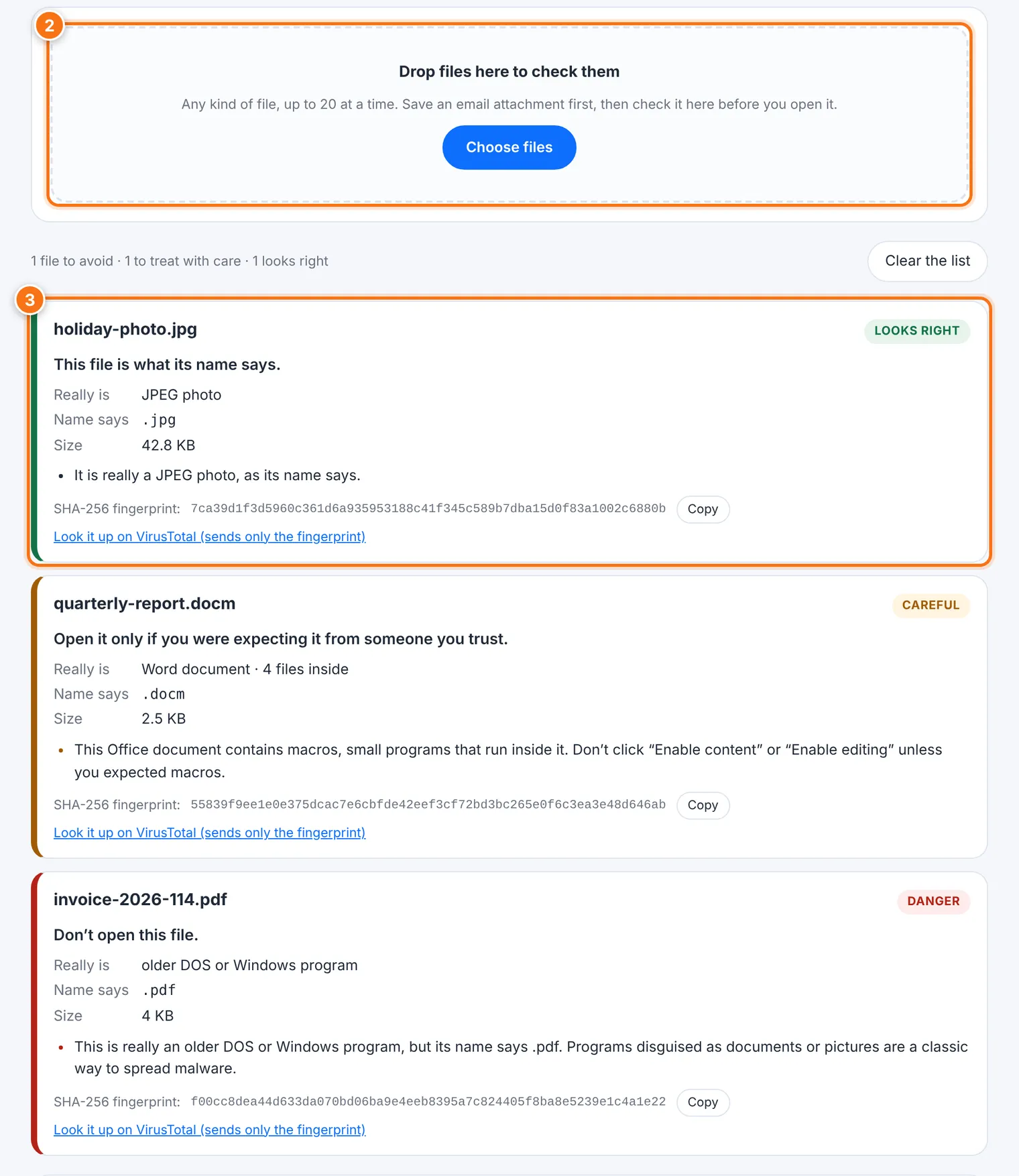
Save the attachment or download to your device first. Don't open it.
Drop up to 20 files onto the box, or press Choose files.
Each file gets a result and a short explanation:
| Result | What it means |
|---|---|
| Danger | Don't open this file. For example, a program disguised as a document. |
| Careful | Open it only if you were expecting it from someone you trust. For example, an Office file with macros. |
| Note | Probably fine, but worth noticing. For example, a renamed file. |
| Looks right | The file is what its name says. |
Each result also shows Name says and Really is, so you can compare them.
File Truth also calculates the file's SHA-256 fingerprint. If you like, use Look it up on VirusTotal. This sends only the fingerprint, never the file.
Clear the list starts over.
What it catches
Disguised programs: a program renamed invoice.pdf, a shortcut called Contract.docx, or photo.jpg.exe.
Tricks in the name: hidden characters that reverse letters, double endings, or spaces that push the real ending out of sight.
Risky documents: Office files with macros, PDFs that run scripts or launch programs, and RTF files with files packed inside.
Phishing attachments: web-page files (.html) with a password form, or that send what you type to another site.
Archives and disk images: programs or disguised names inside a ZIP, and disk images (.iso, .img, .vhd) or password-protected archives, which are often used to get past email scanners.
If you see "Enable content" or "Enable editing" in a document File Truth flagged for macros, don't click it unless you were expecting macros.
What it does not do
It isn't an antivirus. A file can be exactly what its name says and still be harmful. A careful attacker can also hide things this check can't see.
It doesn't look inside every archive. It reads ZIP files, but not RAR or 7-Zip, and it doesn't open archives inside archives.
Very large files are only checked at their beginning and end, and files over 300 MB get no fingerprint here. Use Fingerprint for those.
Common problems
| Problem | What to do |
|---|---|
| "This file couldn't be read" | Close the file in any program that has it open, or save a fresh copy, then try again. |
| "… more not checked (up to 20 at a time)" | Check the rest in a second round. |
| A file from a friend says Danger | Don't open it. Ask them, by phone or a new message, whether they really sent it. Their account may have been taken over. |